


Friendly For Twitter/X
3.7574.00 Reviews
App Specs
- Version
- 4.5.1
- Updated On
- License
- Free
- Downloads
- 1,000,000+
- Developer
- Friendly App Studios
- Categories
- News & Magazines
- Platform
- Android, iOS
Screenshots
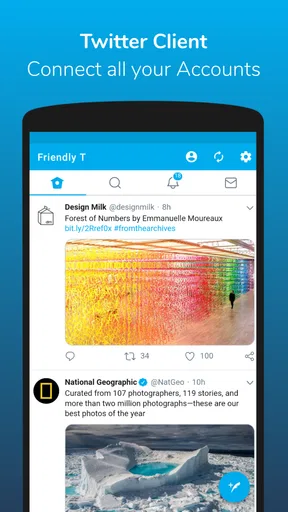


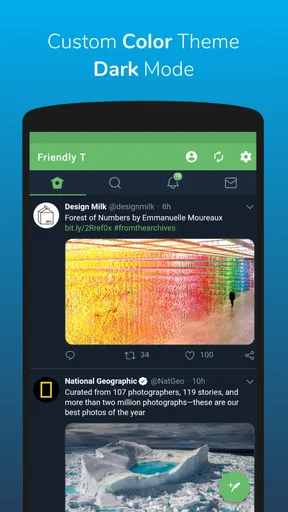

 Analysis by AppCompare
I tend to notice friction in a social app less when I’m casually browsing and more when I’m trying to do something specific: switch accounts, save a post, or catch up quickly between errands. That is the lens I bring to Friendly For Twitter/X. It is a social-networking app from Friendly App Studios, and its appeal is a lighter-feeling way to use Twitter/X, with media downloading and battery saving among the reasons to consider it. Whether that trade-off suits you depends on how you use the platform and what you expect from a third-party client.
Where a lighter client can feel different
The first adjustment is remembering that this is an alternative way to access Twitter/X, not a separate social network. Your usual habits still matter: the accounts you follow, the posts you want to see, and the actions you take are tied to the platform. If something looks different from the official app, I would first treat it as a difference in presentation or workflow rather than assuming your account has changed.
That distinction matters most when you rely on a particular screen or interaction. People who move through the official app by muscle memory may need a little time to locate familiar actions. I’d avoid judging the experience after only a quick glance; spend a session opening the parts of the feed you use most, then decide whether the layout actually saves effort.
Media downloading is a practical draw, but it also changes how I’d use the app. If I come across a clip I want to revisit, saving it can be more useful than hunting through a long timeline later. I would still be selective: keep downloads for content you have a legitimate reason to retain, and remember that saving a file does not grant permission to repost someone else’s work.
Setup checks before you blame the app
When a social client does not behave as expected, I start with the basics rather than changing several settings at once. I check that I am signed into the intended account, that the phone has a working connection, and that the app is current. Friendly’s current version is 4.5.1, and it supports Android 5.0 and later, which makes it an option for some older Android devices as well as newer ones.
If you manage more than one profile, confirm which account is active before posting, replying, or saving something. That small pause is especially useful when you switch between a personal account and one used for a club, side project, or small business. A wrong-account post is harder to undo than a few seconds spent checking the profile first.
Battery saving is useful as a goal, but I would not assume it can overcome every phone-level setting or network condition. If the app seems to pause or load slowly, compare what happens on a stable connection and check whether the phone itself is limiting background activity. Making one change at a time helps identify whether the friction comes from the app, the device, or the connection.
Worth Reading Before You Choose

EA SPORTS FC Mobile 26 Is a Bigger Football Game, but It Takes Time

Flipboard Shows What News Apps Must Do Beyond the Feed

Switching to Android Auto Means Rethinking Your Driving Routine

Google Calendar Makes a Crowded Week Easier to Manage

Ludo King Makes the Most of the Minutes Between Plans

Baby Panda World Brings Quick Play to Modern Phones, but Its Game Library Feels Busy
Recovering a routine when something goes wrong
If the feed does not refresh, I would try a simple sequence: check the connection, move away from the current screen and return, then reopen the app if needed. Avoid repeatedly tapping an action while the page is still responding; duplicate attempts can make it harder to tell what actually happened. For a post that matters, verify its status before sending it again.
For a missing saved media file, check the location where your phone normally keeps downloaded items and make sure you gave the download time to complete. If you cannot find it, retry once after confirming the connection rather than repeatedly triggering the same action. This is a sensible way to troubleshoot without treating every delay as proof that the app has failed.
When a problem affects only one account, switch carefully and see whether the same issue appears elsewhere. If it happens across accounts, the cause may be broader than a particular profile. Keeping track of what you tried—without changing several options together—makes it easier to decide whether to keep using the app or return temporarily to the official client for a time-sensitive task.
When the app may not be the cause
A third-party client depends on the service it connects to, so not every empty timeline or failed action is something a different interface can fix. A network interruption, an account-specific issue, or a temporary problem with the platform can look much like an app fault. I find it more useful to test the same account and connection in the usual client before making a bigger change.
There is also a difference between wanting a simpler browsing experience and expecting every platform feature to appear in exactly the same place. If you depend on a particular tool or a new interface element, check that your normal workflow still works before making this your only way to access the service. For urgent account tasks, keeping the official app available as a fallback is a practical choice rather than a criticism.
Who is likely to appreciate it
I can see this being a good fit for someone who mainly reads their timeline, checks a few profiles, and occasionally wants to keep media for later. It may also suit people who find the standard client busy and would rather explore a more streamlined alternative. The strongest case is not that everyone needs another social app; it is that some users value a different balance of browsing, battery use, and media handling.
It is less compelling for someone who depends on exact feature parity, prefers to keep all account activity inside the official app, or does not want to adjust to a different layout. If your main frustration is a platform-level issue, changing clients may not solve it. And if you rarely download media or care about reducing battery demands, the reasons to switch may be modest.
A realistic day-to-day test
Imagine checking a local community account during a commute, switching to a personal profile at lunch, and coming back to a clip later in the evening. In that routine, I would pay attention to three things: whether the account switch is clear, whether the feed is comfortable to scan in short bursts, and whether saving the clip is straightforward enough to be worth doing. Those observations tell you more than simply opening the app once and deciding that it looks different.
I would also test the app during a longer browsing session rather than relying on a few minutes of use to judge battery impact. Compare similar sessions on your own phone, with similar network conditions, and treat the result as a personal impression instead of a promise. Battery use varies with device settings and what you do, so the useful question is whether the app feels better in your actual routine.
One useful habit is to save only media you genuinely expect to revisit, then organize or remove files using your phone’s normal tools. That keeps the downloader from turning into a pile of forgotten clips. Another is to make a quick account check before any public action. These small choices reduce common annoyances without requiring complicated setup.
How it compares with familiar alternatives
The obvious comparison is the official Twitter/X app. The official client is the natural choice if you want the platform’s standard interface and prefer to avoid learning another workflow. Friendly offers a different emphasis: a lighter-feeling experience, battery saving, and media downloads. I would choose between them based on the task, not on a blanket claim that one is always better.
Compared with simply viewing posts in a mobile browser, a dedicated app can feel more convenient for regular checking and account switching. A browser may still be enough for occasional visits or for someone who wants fewer apps on the phone. The trade-off is personal: if you open the service several times a day, a client designed for repeat browsing may feel more natural; if you rarely use it, installing another app may not add much.
For people who already use the official client comfortably, I would test Friendly alongside it before moving everything over. That gives you a fallback while you learn where familiar actions live and lets you compare the parts that matter to you. A gradual trial is especially sensible if you post on behalf of an organization or depend on the account for timely updates.
Friendly For Twitter/X is free to install, with in-app purchases ranging from $1.99 to $9.99 per item. It is rated for Teen users. On Google Play, it has an average rating of 3.7 from around 7.9K ratings, and it has passed 1M installs. Those figures suggest an established audience, but they do not tell me whether its particular workflow will suit your phone and habits.
My practical recommendation is to treat it as an alternative to test, not an automatic replacement. Give it a few ordinary sessions, check your key account actions, and see whether the lighter approach and media handling earn a place in your routine. If the layout feels natural and it helps with the way you browse, keep using it; if you spend more time searching for familiar controls than reading, the official app or a browser is likely the better fit.
In short, the value here depends on the small details of your day: how often you switch profiles, whether you revisit media, and how much you care about a less demanding browsing experience. I would recommend trying it to people curious about those trade-offs, while advising feature-dependent users to keep their usual option close until they have checked their essential tasks.
Ever found yourself endlessly scrolling through Twitter, yet wishing for a more streamlined experience? Well, let me introduce you to Friendly For Twitter/X. This app promises to enhance your time on the platform with its unique features and customizable options. Let’s dive into what makes this app a must-try for any Twitter enthusiast.
First Impressions Matter
From the moment I opened Friendly For Twitter/X, I was greeted by a clean and intuitive interface. Unlike the standard Twitter app, this one felt less cluttered and more user-friendly. The app is designed with simplicity in mind, making it easy for anyone to navigate, whether you're tech-savvy or not.
Customization at Its Best
One of the standout features here is the customization options. You can tweak the theme, change the font size, and even adjust the color scheme to suit your mood. It’s like having your personal toolkit to make Twitter feel more like home. If you’re like me and enjoy a personalized touch, you’ll appreciate the ability to tailor your feed to your liking.
Moreover, the app supports multiple accounts. Managing several profiles can be a hassle, but Friendly makes it seamless. Switching between accounts is smooth and hassle-free, ensuring you never miss a beat with your followers or favorite topics.
Ad-Free Experience
Let’s be honest, ads can be a real buzzkill. They’re everywhere on social media, interrupting your scrolling time. But here’s the kicker: Friendly For Twitter/X offers an ad-free experience! Yes, you heard that right. Say goodbye to those annoying pop-ups and hello to uninterrupted browsing. This feature alone makes the app worth a try.
Battery Saver Mode
We all know how quickly social media apps can drain your battery. Thankfully, this app has a battery saver mode that optimizes performance without compromising on functionality. This is perfect for those long commutes or lazy days when you just want to relax and scroll without worrying about your phone dying.
Privacy Features
In today’s digital age, privacy is paramount. Friendly For Twitter/X takes your privacy seriously and offers various features to protect your data. You can easily manage permissions and control the information you share. It’s reassuring to know that your personal data isn’t being unnecessarily exposed.
Final Thoughts
Overall, Friendly For Twitter/X is a game-changer for anyone looking to enhance their Twitter experience. Its customization options, ad-free browsing, and privacy-focused features make it a top contender for your go-to Twitter app. Plus, the battery saver mode is a nifty addition that ensures you can keep scrolling as long as you want.
So, if you're tired of the same old Twitter interface and want something fresh and tailored to your needs, give Friendly For Twitter/X a shot. It might just become your new favorite way to tweet, retweet, and engage with the world.
Ready to try it out? Head over to the app store to download and experience it for yourself. Happy tweeting!
Pros
- Customizable interface enhances user experience.
- Consumes less data than official app.
- Supports multiple accounts seamlessly.
- Ad-free version available for a smoother experience.
- Advanced mute and filter options to customize feed.
Cons
- Missing some official Twitter features.
- Occasional bugs with media uploads.
- Limited support for new Twitter updates.
- Push notifications can be delayed.
- UI might feel outdated to some users.
FAQs for Friendly For Twitter/X
What features does Friendly For Twitter/X offer compared to the official app?
Friendly For Twitter/X enhances the user experience with features like ad-blocking, customizable themes, and advanced search options. It also allows for multiple account management and provides a streamlined interface that focuses on user content without unnecessary clutter. These features make it a popular alternative to the official app.
How does Friendly For Twitter/X handle privacy and data security?
Friendly For Twitter/X prioritizes user privacy by offering options to control data sharing and tracking. It doesn’t collect personal data beyond what's necessary for functionality. Users can adjust privacy settings to limit what information is accessed, ensuring a more secure and private browsing experience.
Is Friendly For Twitter/X compatible with both Android and iOS devices?
Yes, Friendly For Twitter/X is available for both Android and iOS platforms. This cross-platform compatibility ensures that users can enjoy its features regardless of their device preference. The app is regularly updated to ensure smooth performance on the latest operating systems.
Are there any in-app purchases or subscription fees associated with Friendly For Twitter/X?
Friendly For Twitter/X offers a free version with essential features. However, for users seeking enhanced functionality, there are in-app purchases available. These include premium features like additional themes and customization options. There are no mandatory subscriptions, allowing users to choose based on their needs.
How user-friendly is the interface of Friendly For Twitter/X?
Friendly For Twitter/X is designed with a focus on simplicity and ease of use. Its interface is intuitive, allowing users to navigate effortlessly through their feeds, notifications, and messages. The customization options further enhance user experience by allowing personalization according to individual preferences.


